Back to blog
Article
How to Shoot Videos of Mobile Toilets
Admin October 13, 2026
The following tips can be referred to for shooting videos of mobile toilets, and adjustments can be made flexibly in combination with the shooting ideas for smart toilets:

1. Scene and Composition Design
- Multi-angle Display of Appearance: Use a pull-back shot to gradually approach the mobile toilet from a distance, showcasing its overall structure and environmental adaptability; or use a 45° rotating shot to highlight details such as doors, windows, and ventilation openings, enhancing the sense of three-dimensionality.
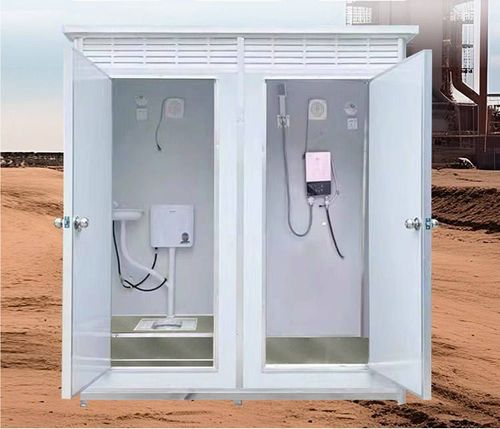
- Presentation of Internal Space: After entering the toilet, use a circular shot to capture the internal layout, focusing on the positional relationships between facilities such as the toilet, sink, and lighting to demonstrate space utilization; if the space is narrow, try a low-angle upward shot to create a sense of openness.
- Close-up of Functional Details: For unique designs of the mobile toilet (such as folding structures, eco-friendly materials, and smart flushing systems), use a macro lens or manual focusing to capture details like operation buttons, connectors, and seals, accompanied by text annotations to explain functions.
2. Dynamic Shot Application
- Simulating the Usage Process: Use shots with obstructions moving right or left to simulate the complete process of a user opening the door, entering, using, and leaving, enhancing the video's immersion; if convenience needs to be emphasized, speed up the playback of dynamic scenes like door opening or folding storage.
- Environmental Interaction Shooting: In outdoor scenes, capture the integration of the mobile toilet with the natural environment (such as grasslands or beaches), or showcase its transportation by trailer and rapid installation process, highlighting the advantages of its mobile nature.
3. Light and Color Control
- Utilization of Natural Light: When shooting during the day, choose a time with even lighting to avoid backlighting that can make the interior appear dark; if the interior lighting is insufficient, supplement with soft lights to ensure clear visibility of facility details.
- Enhancement of Color Contrast: By adjusting the white balance or post-production color grading, highlight the contrast between the main color of the mobile toilet (such as white or blue) and the environmental background to enhance visual appeal.
4. Addition of Auxiliary Elements
- Text and Animation Annotations: Add arrows, size annotations, or functional descriptions to key frames to help viewers understand design highlights; if shooting educational videos, insert 3D animations to demonstrate internal structures or working principles.
- Sound Effects and Background Music: Add environmental sound effects such as door opening and flushing sounds to enhance realism; choose light and concise melodies for background music to avoid interfering with narration or product display.
Related