Back to blog
Article
How to Shoot Videos of Mobile Toilets
Admin September 27, 2026
For shooting videos of mobile toilets, you can refer to the following general shooting techniques and flexibly adjust them by incorporating some methods used for shooting smart toilets:

1. Scene Planning and Equipment Preparation
- Define the Theme: Determine the core content of the video, such as the exterior design, interior functions, user experience, or cleaning and maintenance of the mobile toilet, to avoid cluttered content.
- Equipment Selection: Choose equipment based on your needs. For shooting with a mobile phone, ensure clear image quality (e.g., 1080P or 4K resolution). For professional shooting, use a camera with a stabilizer or tripod to reduce camera shake.
- Lighting Control: Prioritize natural light. If the lighting is insufficient, supplement it with soft lights or LED lights, avoiding direct strong light that may cause reflections or heavy shadows.
2. Lens Application Techniques
- Pull-back Shot: Slowly pull back from inside the mobile toilet to show the overall appearance and environment, highlighting its portability or integration with the surroundings.
- Circular Shot: Rotate slowly around the mobile toilet to comprehensively display exterior details (e.g., material, color, door lock design), enhancing the dynamic feel of the footage.
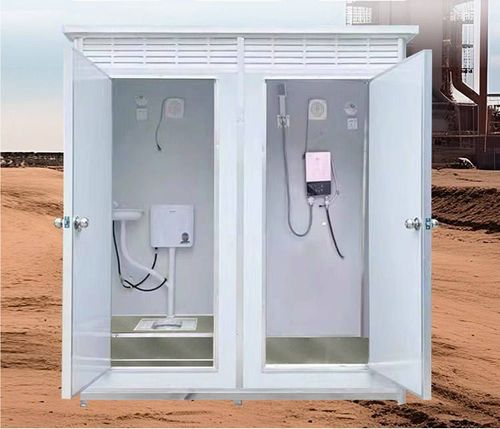
- Close-up Shot: Focus on key parts, such as interior facilities (toilet, sink), ventilation openings, or cleaning devices, accompanied by text explaining functional features.
- 45° Angle Rotation Shot: Shoot the interior space from a 45° angle above, simulating the user's perspective and intuitively presenting the layout's rationality.
3. Content Presentation and Narrative Logic
- Step-by-Step Display: Shoot according to the usage process (e.g., opening the door, entering, using facilities, leaving), accompanied by voice or subtitle explanations of each step to enhance practicality.
- Comparative Shooting: If highlighting the advantages of mobile toilets, compare them with traditional toilets (e.g., space utilization, cleaning convenience) to enhance persuasiveness.
- User Perspective: Shoot the process of users entering and operating, capturing natural reactions (e.g., surprise, satisfaction) to increase authenticity.
4. Post-production and Optimization
- Editing Pace: Delete redundant footage to keep the video concise (recommended length of 1-3 minutes). Slow down or repeat key information for emphasis.
- Add Subtitles and Annotations: Add arrows or text explanations at key parts (e.g., ventilation openings, drainage outlets) to help the audience understand functions.
- Background Music and Sound Effects: Choose upbeat music to enhance the atmosphere and add sound effects like door opening and flushing to increase realism, but control the volume to avoid interfering with the narration.
5. Safety and Privacy Considerations
- Avoid Shooting Others: If shooting in public places, ensure no one else is in the frame or use mosaics to obscure faces.
- Cleaning and Maintenance: Clean the interior of the mobile toilet before shooting to maintain cleanliness and avoid affecting the visual appeal.
Related