How to Close the Door of an Intelligent Mobile Toilet
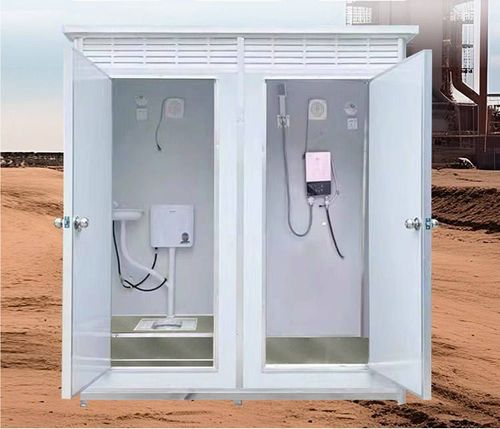
The method of closing the door of an intelligent mobile toilet depends on the specific model and design. Common types include automatic induction locks and mechanical/electronic lock sliding doors, and privacy protection and safety regulations should be observed during operation.
Closing Operation for Automatic Induction Lock Models
Some high-end intelligent mobile toilets are equipped with an automatic induction lock system, and the door-closing process usually consists of two steps:
- Physical Door-Closing Action: After entering the toilet, the user needs to manually close the door completely to the closed position. At this time, the infrared or pressure sensor on the door frame will detect that the door is closed and trigger the internal circuit.
- Automatic Locking Mechanism: About 3 seconds after the door is closed, the system will automatically activate the electronic lock, driving the lock tongue into the lock hole of the door frame through a motor to form a physical lock. This process does not require additional user operation, but care should be taken to avoid forcibly pushing or pulling the door within 3 seconds, as this may trigger the anti-pinch sensor and cause the door to reopen. Precautions: If the door is not completely closed (e.g., there is a gap), the sensor may not be able to recognize the closed state, resulting in automatic locking failure. In this case, the door needs to be pushed closed again, or the door frame should be checked for deformation and the sensor for obstruction.
Closing Operation for Mechanical/Electronic Lock Sliding Doors
Another type of intelligent mobile toilet adopts a design combining mechanical or electronic locks with sliding doors, and the operation steps are as follows:
- Sliding Door Closure: The user needs to manually push or pull the door in the closing direction until the door is fully flush with the door frame. Some models are equipped with a magnetic suction device at the edge of the door, which will make a "click" sound when closed to indicate that it is in place.
- Manual Locking: After closure, locking needs to be completed through a door bolt, knob, or electronic button. For example, for a mechanical lock, the door bolt needs to be inserted into the lock hole of the door frame and rotated to the locked position; for an electronic lock, the "lock" button on the internal panel needs to be pressed, or the password/fingerprint needs to be entered through the touch screen for confirmation. Safety Tips: This design relies on the user to actively lock the door. If the door bolt is not fully engaged or the electronic lock is not activated, the door may accidentally open due to external forces (such as wind pressure). Before use, the lock status needs to be confirmed, and some models will emit a beep alarm when the door is not locked.
General Operation Suggestions
Regardless of the type, after use, it is necessary to check whether the door is firmly locked, which can be confirmed by gently pushing the door body or observing the lock indicator (if any). If a malfunction occurs (such as automatic lock failure or a stuck door bolt), maintenance personnel should be contacted immediately, and avoid forcibly damaging the door body or lock.